By Chris Liversidge ·
4th May, 2026
· Performance Marketing
By Chris Liversidge ·
4th May, 2026
· Performance Marketing


Interrogate Your Paid Performance directly in Claude, Gemini & CoPilot
After Meta's announcement last week of their CLI giving them parity with Google Ads who had previously released their equivalent toolkit, marketers can today directly query and optimise their Paid Media investments across the majority of their walled garden spend.
This is a game changing moment for marketers who have previously been gatekept behind 3rd party tools to allow natural language querying of performance in your campaigns.
This all means that today, you can crack open your AI of choice and immediately start bringing the insight and optimisation power of the latest foundation AI releases to bear on your strategy.
Lets walk through doing just that with Gemini:
Setting Up Prompting in Gemini
To enable Gemini to provide insights on your campaigns, you need to set up the Google Ads API Developer Assistant locally. Here is the easiest way to do it:
1. Prerequisites
Before starting, ensure you have:
- Python 3.10+ installed.
- A Google Ads Developer Token (found in your Google Ads Manager Account under Tools & Settings > API Center).
- Your OAuth 2.0 Client ID and Secret.
2. Install the Gemini CLI
If you haven't already, install the core CLI tool:
npm install -g @google/gemini-cliYou will also need a Gemini API Key from Google AI Studio.
3. Set up the Assistant
Clone the repository and run the setup script:
git clone https://github.com/googleads/google-ads-api-developer-assistant.git
cd google-ads-api-developer-assistant
./install.sh  # Use install.ps1 if you are on Windows
4. Configure Your Credentials
Place your google-ads.yaml file (which contains your developer token and OAuth info) in your home directory. This allows the tool to authenticate with your account.
What Gemini Can Do Once Set Up
Once the installation is complete, you can start the assistant by typing gemini in your terminal. You can then ask questions like:
- Campaign Performance:"Show me which campaigns had the highest ROAS in the last 30 days."
- Auditing:"Find all enabled ad groups that don't have any active ads."
- Technical Queries:"Generate a GAQL query to get all keywords with a quality score below 5."
- Execution: The tool can actually run the code it generates, fetch the data from your account, and display it as a table or save it to a CSV.
+€692k Automated Incremental Revenue
Despite having Corvidae AI in place for 3 years, QVC still found an additional €692k in a holdout test of Google Ad campaigns running Corvidae's conversion pixel compared to Google Ads' own.
"...working with Corvidae has been game changing" - QVC Global Performance Marketing Manager, Kristina Neumeyer.
Discover the power of AI path stitching and automated enrichment of your AdTech with Corvidae AI and QueryClick's Paid Media Team.
Cut CPA by 26% & Increase Revenue by 41%
Using Corvidae AI to remove reliance on 3rd party cookies we built out customer journeys that were 39% longer, allowing us to see much earlier in the customer consideration period.
Giving this data to Google Ads to use for bid optimisation allowed us to demonstrate a 40% increase in ROAS, a 26% reduction in CPA and a growth of 41% in revenue.
Meet the QC team today and learn how we could rebuild your data and deliver incremental growth for you.


45% CPA Reduction & Doubled Conversion Journey Length
Under increasing pressure to save wasted media spend, Corvidae AI was deployed to build longer customer journeys using its globally patented AI path stitching technology.
A roaring success for Western Union, Corvidae built journeys 132% longer than Google or Adobe could, revealing the influence of earlier touchpoints on Western Union revenue.
Feeding this data back into Google Ads allowed Corvidae to automate reducing Cost Per Acquisition (CPA) by 45% - a staggering result that saved significant media spend ready to be reallocated into newly efficient Paid Campaigns anywhere in their marketing mix.
Corvidae AI: Ready to Use with Google & Meta CLIs
QueryClick's preferred attribution and ad automation partner, Corvidae AI is natively able to support integration with AI CLIs by design.
Corvidae is designed to send conversion actions to Google Ads, which then are used to influence bidding. Typically this delivers significant value immediately for customers, as the improvement in path stitching created by Corvidae's unique and globally patented AI stitching, means that the values being sent to Google Ads are significantly different from Google's own conversion actions.
Here's a comparison showing a native conversion journey on the top, and Corvidae conversion journey on the bottom:
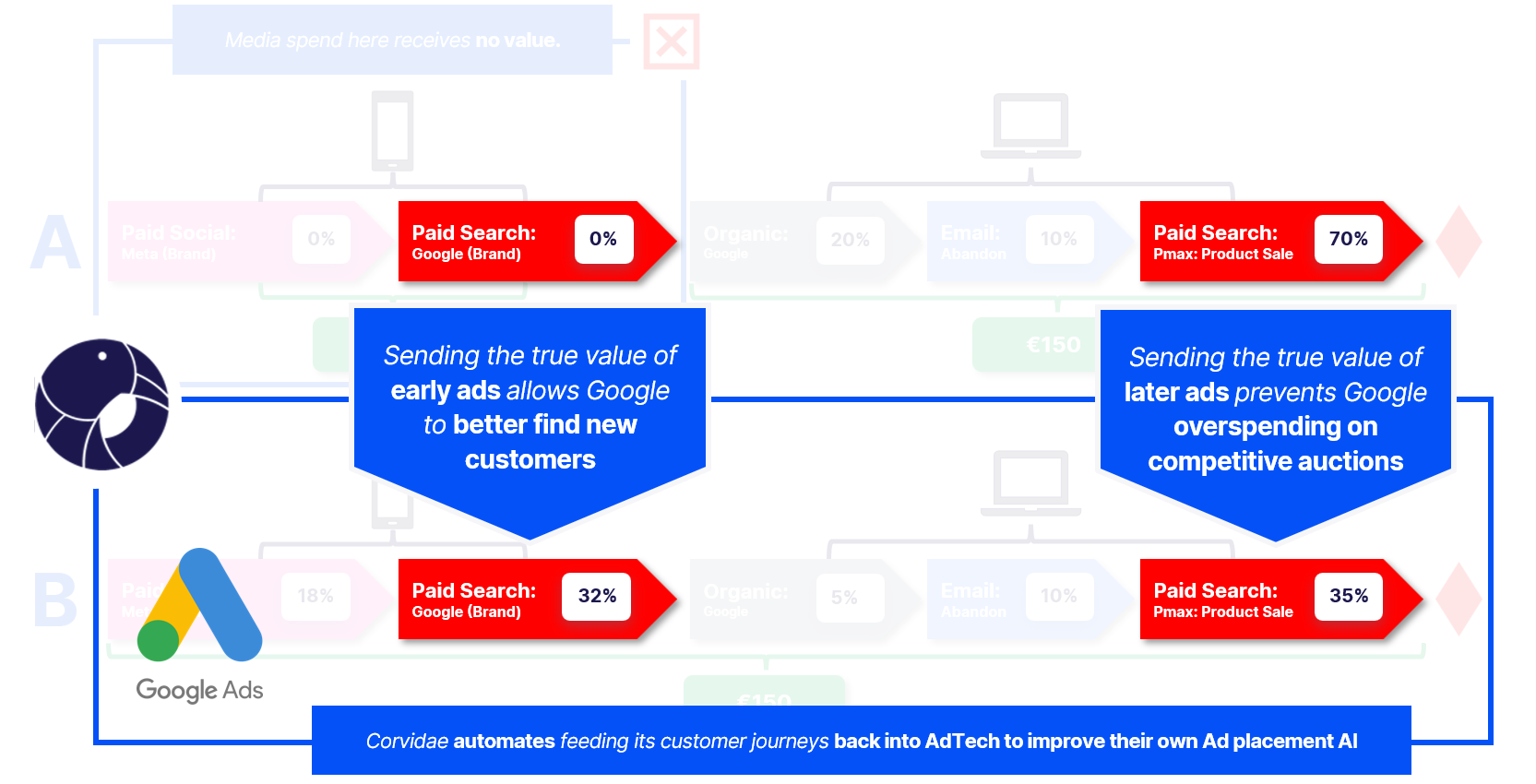
When the latest AdTech CLIs are queried, they will use the selected primary conversion actions setup in your account. This means all your insights from Gemini, Claude, and Copilot will be using Corvidae conversion actions and the Corvidae attribution model you are using across all reporting.
The QueryClick team are excited to be working on the leading edge with AI CLIs, so don't be shy about reaching out if you have any questions about getting started with your preferred frontier model today - there's a world of powerful insight out there!
Author